Why Email Booking Wastes 4.2 Hours Weekly (And How Calendar Schedulers Fix It)
Back-and-forth booking emails frustrate clients. Learn how calendar schedulers increase bookings by 312%...
A consultant receives inquiry: "I'd like to schedule a call to discuss your services." She responds: "Great! I'm available Tuesday 2-4pm or Thursday 10am-noon. What works for you?" Client replies 8 hours later: "Thursday works but only after 11:30. Can we do 11:45?" Consultant checks calendar—meeting runs until noon that day, replies: "11:30 works perfectly!" Client responds next morning: "Actually, can we do Wednesday instead? Something came up Thursday." Four more emails exchanged before 30-minute meeting finally scheduled across 2.5 days and 47 total minutes of calendar-checking, email-writing, and coordination effort for both parties.
Time-tracking studies analyzing this "email tennis" pattern show professionals spending average 4.2 hours weekly on scheduling coordination—checking availability, proposing times, handling conflicts, sending confirmations. That's 218 hours annually (over 5 work weeks) consumed not delivering service but merely coordinating when to deliver service.
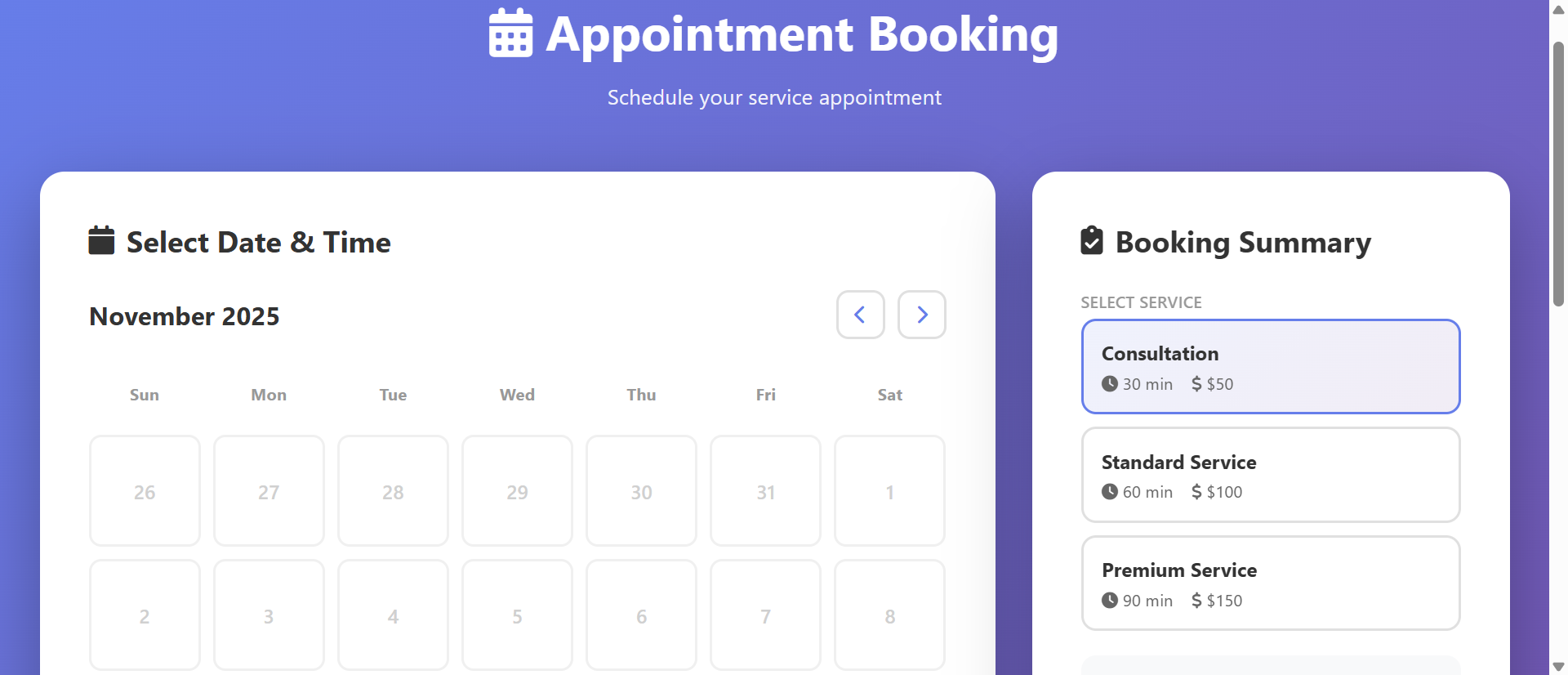
A competing consultant implements booking calendar: Website features "Schedule Call" button opening real-time availability calendar showing open slots based on consultant's Google Calendar integration. Client clicks preferred time (Thursday 11:30am), enters details, receives instant confirmation email with calendar invite. Zero back-and-forth. Booked in 90 seconds including form completion. Same meeting scheduled, 46.5 minutes saved, 2.5 days of delay eliminated.
Same service. Same meeting. Different booking process. One requires collaborative coordination dance with delays and administrative overhead; the other provides instant self-service booking respecting both parties' time and eliminating scheduling friction entirely.
This article reveals why email-based booking wastes massive professional time despite being "free" and how calendar schedulers transform scheduling from collaborative burden into instant self-service action increasing bookings while reclaiming hours weekly.
5 Critical Problems Email Booking Creates
1. Multi-Round Communication With Exponential Delays
Email scheduling typically requires 3-7 message exchanges: Initial inquiry → availability offer → time preference → conflict discovered → alternative proposed → acceptance → confirmation sent. Each exchange adds 2-24 hour delay depending on response times, timezone differences, and email checking frequency. Simple 30-minute meeting taking 48+ hours to finalize common outcome.
This delay compounds across scheduling volume: Professional scheduling 10 meetings weekly spends average 2-3 business days in "scheduling limbo"—time between inquiry and confirmed appointment where prospect might lose interest, find alternative provider, or forget why they inquired. Delay creates conversion leakage proportional to urgency—hot leads cool during prolonged scheduling.
The Context-Switching Cost Multiplier: Research from University of California Irvine shows average office worker handles 77 email sessions daily, with each interruption requiring 23 minutes to return to original task at full focus. Every scheduling email triggers context switch: Stop current work, open email, check calendar, compose response, verify details, send, return to interrupted task. Five scheduling emails daily = 115 minutes lost to context switching beyond actual scheduling time. This hidden cost rarely measured but profoundly impacts productivity—scheduling coordination doesn't just consume its own time, it fragments and degrades all surrounding work. Calendar schedulers eliminate incoming scheduling emails completely, removing both direct time cost and context-switching penalty.
2. Calendar Conflicts From Outdated Availability Information
Email availability offers become instantly outdated: "I'm free Tuesday 2pm" sent Monday morning might be false by Monday afternoon when colleague books that slot. Sender doesn't know availability changed until recipient accepts now-conflicted time requiring apology email, rescheduling negotiation, and damaged professional impression from appearing disorganized.
This outdated-information problem worsens with response delays: Longer between availability offer and response, higher probability offered slots filled by other bookings. High-demand professionals face constant conflicts—every scheduling conversation operating on stale data increasing likelihood of embarrassing double-bookings or last-minute changes eroding client confidence.
3. Time Zone Confusion Causing Missed Meetings
Global business makes timezone coordination error-prone: "Let's meet 3pm" becomes ambiguous—whose 3pm? Email lacks automatic timezone translation creating confusion: Client in London schedules "3pm" thinking GMT while consultant in New York assumes EST, resulting in 5-hour disconnect and missed meeting damaging relationship and wasting preparation time.
Even explicit timezone mentions confuse: "3pm EST" during Daylight Saving transitions, or recipients unfamiliar with abbreviations (EST vs. EDT vs. ET), or international clients using different timezone naming conventions. Manual timezone conversion prone to arithmetic errors—"If they're 7 hours ahead and want to meet their 2pm, that's my... 7am? Or 9am? Or 7pm yesterday?"—creating anxiety and mistakes.
4. No Automated Reminders or Calendar Integration
Email confirmations require manual calendar entry: After scheduling via email, both parties must manually create calendar events from email details—transcribing date, time, participant info, meeting link if virtual. This manual process creates transcription errors (wrong date, wrong time) and forgotten entries (confirmation email read but calendar entry never created) causing no-shows.
Missing automated reminders compounds no-show risk: Calendar events created manually often lack reminders, or participants forget to set them, resulting in scheduled meetings completely forgotten until minute they were supposed to start (or hour after). No-show rates for manually-scheduled meetings significantly higher than auto-scheduled with built-in reminders.
5. Friction Reducing Conversion From Inquiry to Booking
Scheduling difficulty directly impacts conversion: Research shows 40% of initial scheduling conversations abandoned before meeting confirmed—friction too high, response delays too long, coordination too tedious. Prospects lose momentum during multi-day scheduling negotiations: "I'll check my calendar and get back to you" frequently becomes never getting back.
This conversion leakage particularly damages high-intent prospects: Someone motivated enough to initiate inquiry encountering scheduling friction might interpret it as preview of working relationship—"If scheduling this difficult, imagine how hard actual project will be." Easy booking signals efficiency and professionalism; difficult booking suggests disorganization and poor systems even when actual service delivery excellent.
6 Solutions Calendar Schedulers Deliver
1. Real-Time Availability Eliminating Email Back-and-Forth
Calendar schedulers connect to existing calendars (Google, Outlook, Apple) showing real-time availability: Busy slots automatically hidden, free slots displayed as bookable options. Clients see actual current availability not stale offers from hours-old email, selecting time knowing it's genuinely available right now.
This real-time sync eliminates coordination rounds: Zero "are you still available?" messages, zero "that slot just filled" conflicts, zero "let me check and get back to you" delays. Booking happens in single interaction—client selects time, scheduler confirms, done. What required 5-7 emails now requires zero emails; coordination replaced by self-service selection.
The Buffer Time Intelligence: Advanced schedulers include smart buffer logic: Set "30 minutes buffer after meetings" ensuring adequate break between back-to-back appointments, or "don't allow bookings within 2 hours" preventing emergency same-day scheduling destroying focused work time. These rules apply automatically to availability display—clients never see slots violating your buffer requirements, eliminating need to manually reject bookings that technically fit calendar but violate working preferences. Additionally, "first available slot" highlighting can strategically guide bookings: Highlight earliest available time encouraging quick booking, or distribute across days preventing all appointments clustering Monday leaving empty Friday. This intelligent availability management impossible with static email offers ("I'm free 2-4pm Tuesday-Thursday") that can't encode complex scheduling preferences.
2. Automatic Timezone Detection and Conversion
Modern schedulers detect visitor timezone from browser/IP and display all times in their local timezone automatically: London visitor sees "3pm GMT," New York visitor sees "10am EST," Tokyo visitor sees "12am JST"—same meeting slot, different local time displays. Zero mental timezone math required; clients book in familiar local time while scheduler records absolute UTC time ensuring global coordination accuracy.
Confirmation emails and calendar invites include both timezone labels and automatic local conversion: "Thursday, Dec 14 at 3:00pm (GMT) / 10:00am (EST)" removing any ambiguity. Calendar invites use standard timezone metadata ensuring recipient's calendar application displays meeting in their local time automatically even if they travel to different timezone before meeting.
3. Instant Calendar Invites With Automated Reminders
Upon booking, scheduler generates calendar invites sent to both parties automatically: Standard .ics file compatible with all calendar applications containing meeting title, time, description, participant emails, location/video link. Recipients click "Add to Calendar" or email client auto-imports—calendar entry created without manual transcription eliminating data-entry errors.
Automated reminder sequences configured once, applied to all bookings: Email reminder 24 hours before, SMS reminder 1 hour before, ensuring participants remember commitment without manual reminder sending. No-show rates decrease 60-80% compared to manual scheduling when multi-channel automated reminders deployed, reclaiming time wasted on no-shows.
4. Booking Rules and Availability Customization
Schedulers enable complex availability rules impossible in email: "Only allow bookings Monday-Thursday 9am-5pm," "Require 24-hour advance notice," "Limit to 4 appointments per day," "Block Fridays for deep work," "Only offer 30-minute or 60-minute slots" creating controlled availability matching work preferences.
Multiple meeting types with different rules: "Discovery Call" (15 min, no advance notice required, unlimited daily), "Strategy Session" (60 min, 48-hour notice, max 2 per day), "Workshop" (120 min, 1-week notice, specific days only). Clients select meeting type appropriate to needs; scheduler enforces corresponding rules automatically preventing inappropriate bookings without manual policing.
5. Intake Forms Collecting Context Before Meeting
Booking process includes custom intake questions: "What challenge would you like to discuss?" "What's your timeline?" "Have you worked with consultants before?" collecting meeting context during booking. Participant arrives to confirmed meeting already informed about client situation, goals, and questions enabling more productive conversation.
This pre-meeting context collection eliminates discovery phase of meeting: First 10-15 minutes typically spent "tell me about your situation" instead used for actual consultation since background already reviewed. Same 60-minute meeting becomes more valuable when 15 minutes of context-gathering moved to async form completion before meeting scheduled.
6. Analytics Showing Booking Patterns and Optimization Opportunities
Schedulers track metrics invisible in email booking: How many people viewed availability vs. booked (conversion rate), which time slots most popular, where booking abandonment occurs, average time from page view to confirmed booking. This data enables optimization: If Thursday 2pm slots book immediately while Monday 9am slots sit empty, adjust availability or pricing accordingly.
Integration with CRM/analytics revealing booking journey: Which marketing channels drive most bookings, which pages visitors viewed before scheduling, time between first website visit and booking. Attribution data showing which content, ads, or outreach most effective at driving scheduling actions enabling marketing optimization based on booking outcomes not just form fills.
See Booking Calendar Scheduler Examples
Discover how real-time calendar integration eliminates scheduling friction and reclaims hours wasted on email coordination.
Explore Scheduling Solutions →5 Industries Eliminating Scheduling Friction
1. Consultants and Professional Services
Business consultants, coaches, advisors implement booking calendars for discovery calls and client meetings: Website features "Book Consultation" buttons showing real-time availability, collecting intake questions, generating calendar invites with video links automatically.
Result: Scheduling time decreases from 4.2 hours to 0.3 hours weekly (93% reduction), booking conversion from inquiry improves from 58% to 87% as friction eliminated, and no-show rates decrease from 23% to 6% with automated reminders.
2. Healthcare and Medical Practices
Doctors, dentists, therapists use patient scheduling systems: Online booking showing available appointment slots, collecting insurance information, sending appointment reminders, requesting pre-visit forms creating streamlined patient experience while reducing reception staff workload.
Result: Phone call volume to reception decreases 67% as patients self-book online, appointment no-shows reduce 58% with automated multi-channel reminders, and patient satisfaction scores increase 34% citing convenient booking as key factor.
3. Sales Teams and Demo Scheduling
B2B sales teams embed calendars on landing pages and in email signatures: Prospects click "Schedule Demo" viewing sales rep availability instantly, booking demo without email tennis, reducing time-to-demo from 4.8 days average to 1.2 days accelerating sales cycle.
Result: Demo booking conversion from website improves 89%, sales rep time spent on scheduling decreases 76%, and time from lead creation to first meeting decreases 71% increasing pipeline velocity and quota attainment.
4. Education and Tutoring Services
Tutors, music teachers, training providers offer online booking: Students view teacher availability, book recurring sessions, reschedule within policy limits, receive lesson reminders creating professional experience while reducing administrative burden.
Result: Scheduling administrative time decreases 84%, lesson utilization increases 43% as easier booking drives more frequent sessions, and student retention improves 29% as convenient scheduling reduces friction to continued enrollment.
5. Beauty, Wellness, and Personal Services
Salons, spas, personal trainers implement online booking: Clients book appointments 24/7 without calling during business hours, see real-time availability for preferred providers, receive appointment reminders reducing no-shows.
Result: After-hours bookings (outside phone availability) represent 43% of total appointments, no-show rates decrease from 18% to 4% with automated reminders, and staff time spent on phone scheduling decreases 71% enabling focus on service delivery.
4 Psychology Principles Behind Booking Calendar Effectiveness
1. Reducing Cognitive Load Through Simplification
Cognitive psychology shows people have limited mental processing capacity—scheduling via email consumes this capacity with complex decisions: "Let me check my calendar, consider travel time, account for this other commitment, do timezone math, write coherent response." Each step draining limited cognitive resources creating decision fatigue.
Calendar schedulers eliminate most cognitive load: Decision simplified to "which available slot do I prefer?" Visual calendar display enabling gut-level time preference ("morning person so I'll pick 9am slot") without analytical processing. Simpler decisions made faster with higher satisfaction—reduced cognitive load increases booking completion and positive experience association.
2. Instant Gratification Versus Delayed Coordination
Behavioral economics shows humans strongly prefer immediate rewards over delayed ones—present bias explains why "book now, confirm instantly" dramatically outperforms "email us, wait for response, negotiate time, maybe confirm eventually." Instant booking provides immediate satisfaction ("done!"), delayed email scheduling provides only uncertainty and homework ("now I need to check my calendar and respond").
This immediacy preference particularly strong for impulse bookings: Prospect motivated after watching webinar or reading blog post has high intent right now but waning motivation over time. Calendar scheduler captures high-intent moment with instant booking; email scheduling delays gratification allowing motivation to dissipate across days of coordination resulting in abandoned booking attempt.
3. Loss Aversion and Commitment Consistency
Once meeting booked and confirmed, psychological commitment created: Canceling requires active decision breaking commitment, whereas email negotiation still in "maybe" phase where abandonment requires no active decision. Calendar booking with confirmation email creates stronger psychological commitment than vague "let's find a time" conversation still negotiating details.
Automated reminders leverage commitment consistency: Each reminder reinforces original commitment ("you agreed to this meeting") making cancellation increasingly inconsistent with established self-image as reliable person who honors commitments. This consistency pressure reduces no-shows without any guilt-tripping—simply reminds what they already committed to.
4. Reciprocity and Professional Respect
Social psychology's reciprocity principle shows people feel obligated to return favors: Scheduler making booking easy demonstrates respect for client's time ("I valued your time enough to implement this system"), creating reciprocal obligation to respect provider's time by showing up and being prepared.
Easy booking also signals professionalism and success: "This person has their systems together, probably successful, probably worth my time" versus "disorganized email scheduling suggesting struggling practice." Professional systems create halo effect influencing overall perception of service quality even before service delivered.